What this article says in 30 seconds
- Rental virtual staging should clarify layout and lifestyle quickly
- The staged image must not imply furniture is included unless it truly is
- DesignSense helps teams turn vacant rental photos into clearer listing visuals faster
Use DesignSense for this workflow when you need to:
- Property managers marketing vacant rentals
- Agents preparing rental listings quickly
- Small landlords who need stronger online photos without physical staging
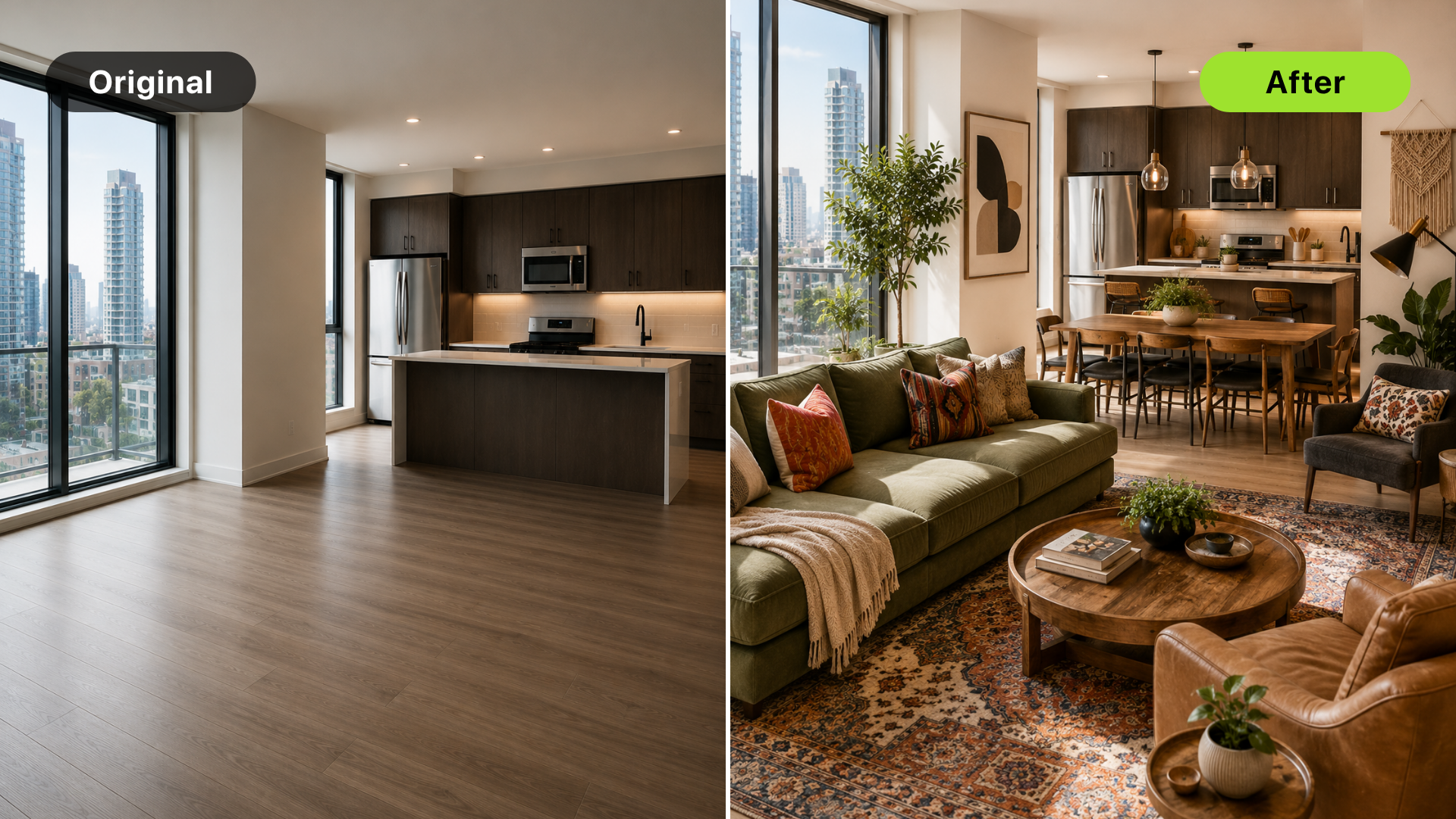
Virtual staging for rental properties is useful when a vacant unit looks cold, small, or hard to understand online. A staged image can help prospects see how the living room, bedroom, or dining area could function before they book a showing.
The key is expectation management. A rental staging image should clarify layout and lifestyle. It should not imply that furniture is included unless the property is actually offered furnished. If you need a broader staging workflow first, read virtual staging for real estate with AI.
The short answer
Use AI virtual staging for rental properties when:
- The unit is vacant
- The layout is hard to read
- Photos need to go live quickly
- The rent price needs stronger visual support
- Physical staging is not practical for turnover timelines
Avoid staging that changes property condition, hides wear, or makes the rental feel more premium than the showing can support.
Why rentals need fast visual clarity
Rental listings often move on faster timelines than sales listings. Teams may need photos during a short vacancy window, and prospects may decide quickly from a gallery. Virtual staging can help by showing:
- How a sofa fits
- Where a dining table could go
- How a bedroom can be arranged
- Whether a den can work as an office
- How an empty unit can feel more livable
That matters most when the unit is clean but visually empty. The staging gives prospects a faster way to understand the space.
Be clear about what is included
Rental-property staging can create confusion if the image looks like a furnished rental. If furniture is not included, the listing copy, captions, or platform fields should make that clear. The staged image should be treated as a visualization, not inventory.
This is especially important for:
- Furnished vs unfurnished rentals
- Short-term rental listings
- Model-unit photography
- Multi-unit buildings with similar floor plans
- Listings where the shown layout is not the exact unit
When the image is digitally staged or altered, follow the disclosure rules for the platform, MLS, brokerage, or property manager workflow.
Stage the rooms that affect conversion
For most rental properties, start with:
- Living area
- Primary bedroom
- Dining or open-plan area
- Office nook or den
Skip utility rooms, bathrooms, and kitchens unless the problem is visual clarity. Those rooms usually need clean photography more than virtual furniture. If the unit is compact, use the guidance from virtual staging for condos because scale and circulation matter in similar ways.
Keep style practical
Rental staging should feel realistic for the target renter.
A luxury style can feel misleading in an everyday rental. A sparse style can make a premium rental feel less valuable than it is. The right direction depends on the unit, rent level, neighborhood, and prospect. Use staging to support:
Turn one room photo into a clearer next step.
Upload a room photo, test one or two believable directions, and get to a publishable listing visual faster.
- Clean function
- Simple comfort
- Believable furniture scale
- The lifestyle the unit can actually support
Do not use staging to hide old flooring, damaged walls, poor lighting, or maintenance issues.
A DesignSense workflow for rentals
Use this workflow when preparing rental listing visuals:
- Choose the rooms that will help prospects understand the unit fastest.
- Upload clean, level source photos.
- Generate one or two realistic staging directions.
- Review whether furniture scale matches the actual unit.
- Reject anything that hides wear, damage, or permanent conditions.
- Save the original image.
- Add disclosure or caption language based on your platform rules.
- Use the AI upscaler only on approved final images.
DesignSense helps rental teams move faster when the input photo is real and the output is reviewed before publication.
Common rental staging mistakes
Avoid these mistakes:
- Implying furniture is included when it is not
- Using luxury styling for a basic rental
- Staging over visible damage
- Changing flooring, walls, fixtures, or views
- Using a model-unit layout without explaining it
- Staging too many photos and creating expectation gaps
Prospects should feel the staged image helped them understand the unit, not that it oversold the showing.
FAQ
Is virtual staging useful for rental listings?
Yes, especially for vacant rentals where prospects need help understanding layout and furniture placement.
Should rental staging look furnished?
It can show furniture as a visualization, but the listing should not imply furniture is included unless the rental is actually furnished.
How many rental photos should be staged?
Usually two to four images are enough. Focus on the living area, bedroom, and any confusing open-plan or office space.
Can virtual staging hide wear or damage?
It should not. Hiding property condition can create trust problems and may violate platform, MLS, or brokerage rules.
Final recommendation
Use virtual staging for rental properties when it helps prospects understand how the unit works. Keep the style believable, make furniture inclusion clear, and do not hide the actual condition of the rental.
When your rental photos are ready, stage rental photos in DesignSense and choose the version that makes the real unit easier to understand.
Turn one room photo into a clearer next step.
Use the free trial to turn one room photo into a staging direction that is easier to review, approve, and publish.