What this article says in 30 seconds
- New-construction virtual staging should clarify finished spaces without changing what is included
- AI staging works best from real room photos or approved finished interiors
- DesignSense helps teams test buyer-friendly room directions before committing to physical staging
Use DesignSense for this workflow when you need to:
- Builders marketing finished but empty units
- Agents preparing new-construction listing photos
- Teams comparing model-home alternatives quickly
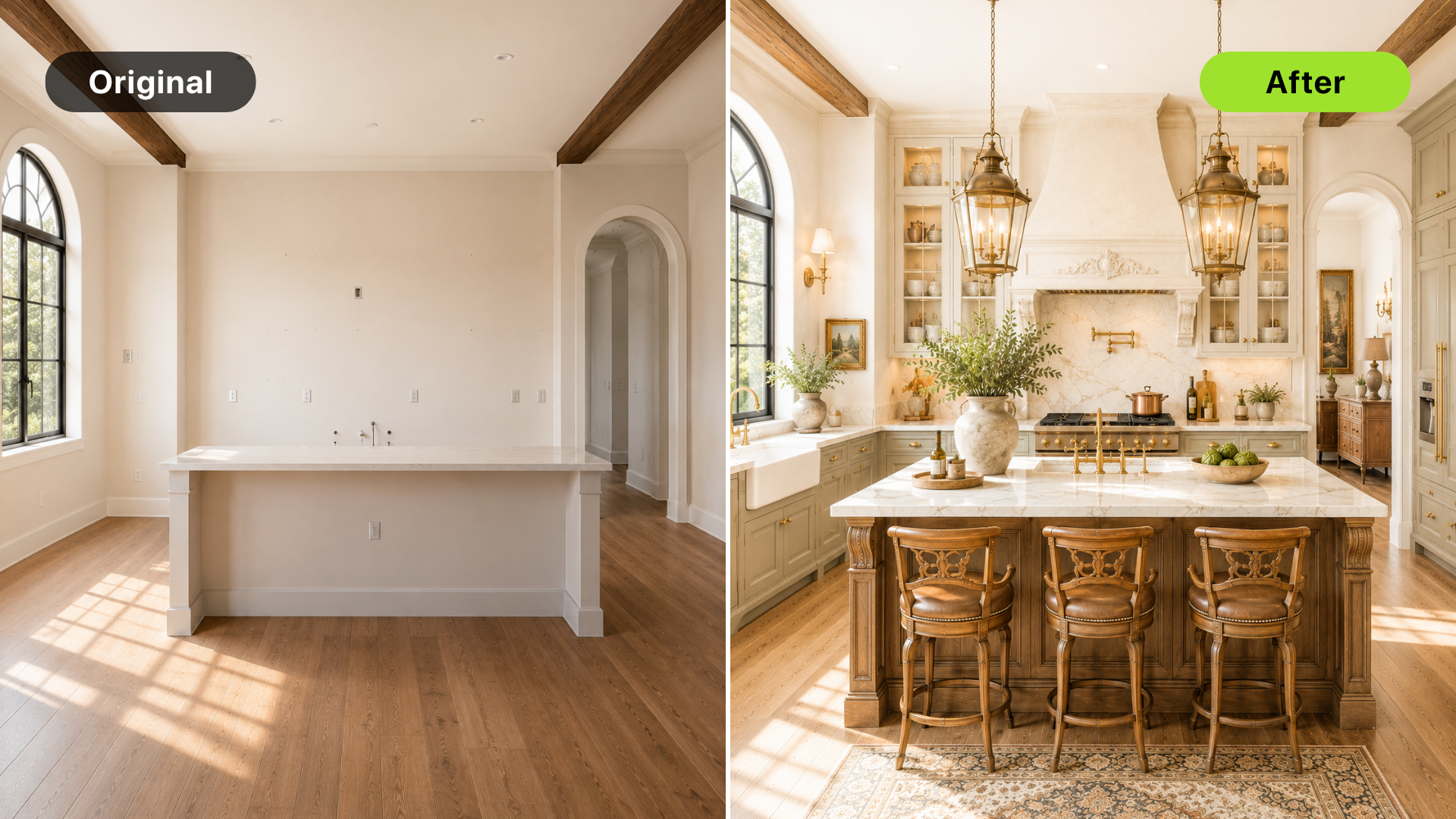
Virtual staging for new construction helps buyers understand finished empty spaces before physical staging is practical. It can show how a living room, primary suite, or flex room might function without waiting for furniture delivery or a full model-home setup.
The important boundary is accuracy. New-construction buyers care about what is included: finishes, fixtures, layout, views, and options. AI staging should add furniture context, not change the product being sold. For a broader property-type framework, read best property types and rooms for AI virtual staging.
The short answer
Use AI virtual staging for new construction when:
- Rooms are finished but empty
- Model-home staging is not available
- Buyers need help understanding scale
- The team wants to test room direction quickly
- Marketing needs listing visuals before physical staging
Avoid it when the room is unfinished, the finish package is uncertain, or the image would imply upgrades that are not included.
Why new construction needs visual context
New construction often has clean lines, fresh materials, and strong photography. But empty rooms can still feel abstract. Buyers may struggle to understand:
- Furniture placement
- Room scale
- Open-plan flow
- How a flex room should be used
- Whether a bedroom feels comfortable
- How the home supports daily life
Virtual staging answers those questions without covering the finishes that make the property valuable.
Stage finished rooms, not promises
The safest new-construction input is a real photo of a finished room.
Use AI staging to add:
- Sofas
- Beds
- Dining furniture
- Simple decor
- Office layouts
- Scale references
Do not use staging to change:
- Flooring
- Cabinets
- Fixtures
- Ceiling height
- Appliance packages
- Landscaping
- Views
- Windows or doors
If the image changes what buyers believe they are purchasing, it is no longer simple staging.
Best rooms for new-construction staging
Start with:
- Main living area
- Primary bedroom
- Open-plan dining area
- Flex room
- Secondary bedroom or guest suite
These rooms help buyers understand lifestyle and scale. Kitchens and bathrooms may not need furniture staging if the finishes already photograph clearly. For room sequencing, see best rooms to virtually stage first in a listing.
Use style to support the build
New-construction staging should match the home's design direction. Consider:
- Architecture
- Finish package
- Price point
- Likely buyer
- Neighborhood expectation
- Builder brand
Do not force a trendy style that fights the actual design. Clean, realistic styling often works better because it lets the construction quality remain visible.
Turn one room photo into a clearer next step.
Upload a room photo, test one or two believable directions, and get to a publishable listing visual faster.
A DesignSense workflow for new construction
Use this workflow:
- Start with real finished-room photos.
- Choose rooms where buyers need scale or purpose.
- Upload the source photo to DesignSense.
- Generate restrained staging directions.
- Compare each output against included finishes and layout.
- Reject versions that imply upgrades or changed conditions.
- Preserve the original image.
- Add disclosure based on brokerage, MLS, builder, or platform rules.
This helps the team move faster while keeping the marketing image tied to the real product.
When physical staging still matters
Physical staging may still be better when:
- The model home experience drives sales
- Buyers need to feel the room in person
- The development has high-end expectations
- The same staged model will be reused for many showings
- Builder presentation standards require physical setup
AI staging can still help before that point. It can test direction, support early listings, and clarify secondary spaces.
Common mistakes
Avoid these mistakes:
- Staging unfinished spaces as if complete
- Changing finish packages
- Adding furniture that blocks key features
- Making the room feel larger than it is
- Showing upgrades without explanation
- Publishing without review from the builder or listing team
New-construction marketing depends on precision. Keep the staging close to the real room.
FAQ
Is virtual staging useful for new construction?
Yes, especially for finished but empty rooms where buyers need scale, warmth, and lifestyle context.
Can AI staging replace a model home?
Sometimes for online marketing, but not always for the in-person experience. Model homes still matter when buyers need to feel the space physically.
Can I stage an unfinished new-construction room?
Be careful. If the room is not finished, you may need a rendering or builder-approved visualization workflow rather than virtual staging from a real room photo.
What should not change in new-construction virtual staging?
Finishes, fixtures, layout, views, windows, doors, and included features should not be changed unless the marketing clearly explains the image as a concept or option.
Final recommendation
Use virtual staging for new construction when it clarifies finished rooms without changing the product. Let the staging support the architecture, not replace it.
When a finished room photo is ready, stage new construction in DesignSense and review the output against the actual finish package before publishing.
Turn one room photo into a clearer next step.
Use the free trial to turn one room photo into a staging direction that is easier to review, approve, and publish.