What this article says in 30 seconds
- Condo virtual staging should clarify scale and function more than decorate the room
- Small units need believable furniture plans that do not overstate space
- DesignSense helps agents test realistic condo layouts from the actual room photo
Use DesignSense for this workflow when you need to:
- Agents marketing vacant or compact condo units
- Listing teams that need clearer small-space presentation
- Condo sellers who need faster online listing visuals
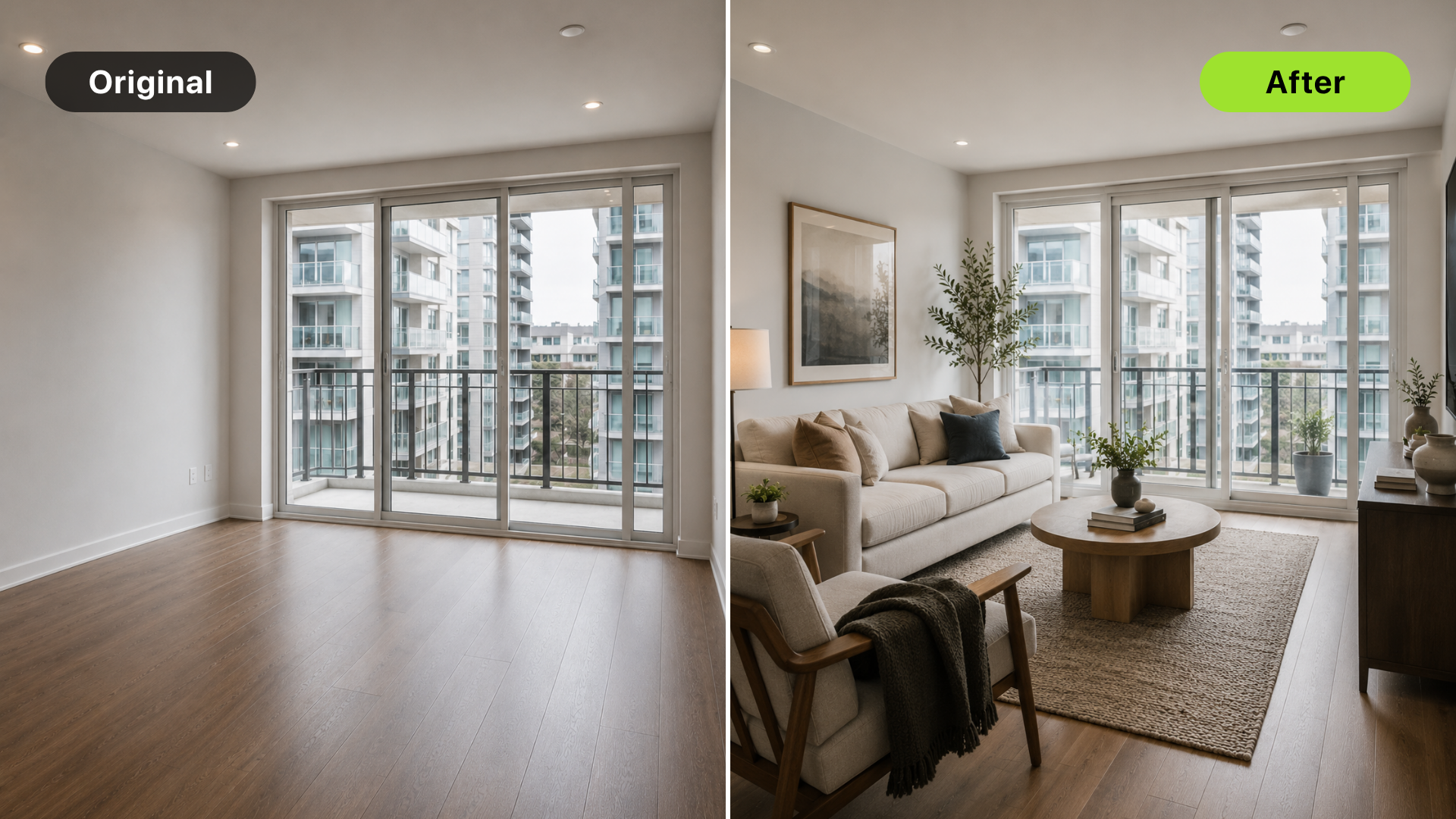
Virtual staging for condos works best when it helps buyers understand scale. Condo buyers often care about whether a room can fit daily life: a real sofa, a dining spot, a desk, storage, and a comfortable bedroom layout.
AI staging can make those answers easier to see, especially when the unit is vacant or visually plain. The staged image should not make the condo look larger than it is. It should make the actual space easier to read. For a room-priority framework, start with best rooms to virtually stage first in a listing.
The short answer
For condo listings, stage rooms that solve buyer uncertainty:
- Main living area
- Primary bedroom
- Open living and dining space
- Small den or office nook
- Balcony-adjacent room when the view matters
Skip staging that makes furniture scale unrealistic or hides the compact nature of the unit. The buyer should understand the condo better, not be surprised during a showing.
Why condo staging is different
Condos often have tighter layouts than single-family homes. That makes furniture scale more important. A staged condo image needs to answer:
- Where does the sofa go?
- Can a dining table fit?
- Is there room for a desk?
- Does the bedroom support a real bed and walking space?
- How does the balcony, view, or amenity lifestyle connect to the unit?
The best staging is restrained. It gives buyers a believable plan for living in the unit.
Stage the living area first
The living area is usually the highest-impact condo staging image because it carries the first impression of size and lifestyle. Use staging to show:
- Sofa placement
- TV wall or focal point
- Dining placement if the room is open-plan
- A simple circulation path
- A realistic scale for the unit
Avoid oversized sectionals, huge coffee tables, or furniture that makes the room look wider than it is. A compact but well-planned layout is more credible than a luxury showroom look that does not fit.
Use office and flex staging carefully
Many condo buyers care about work-from-home flexibility, but a staged office should still fit the room. Good AI staging use cases include:
- Den as office
- Bedroom corner as desk area
- Small nook as reading or laptop space
- Open-plan room with a compact work zone
Do not turn every extra corner into a full office if the unit cannot support it comfortably. The goal is to show possibility without cluttering the image.
Show lifestyle without changing the unit
Condo listings often sell both the unit and the lifestyle around it. AI staging can support that lifestyle by making the room feel warm, practical, and market-ready. It should not change:
- Window views
- Balcony size
- Built-in storage
- Flooring
- Fixtures
- Ceiling height
- Room dimensions
Turn one room photo into a clearer next step.
Upload a room photo, test one or two believable directions, and get to a publishable listing visual faster.
If the source photo has a strong view, keep attention on it. Do not overdecorate the room in a way that pulls focus away from the feature buyers already value.
A DesignSense workflow for condo listings
Use this workflow when staging condo photos:
- Choose the rooms where scale is hardest to read.
- Start with clean, level source photos.
- Generate realistic staging directions in DesignSense.
- Review furniture size against the original room.
- Reject layouts that block circulation or overstate space.
- Save the original photo beside the staged output.
- Add disclosure based on brokerage and MLS rules.
- Upscale only the final approved image if it needs sharper listing quality.
DesignSense is strongest when the team uses it as a fast room-planning review loop from real condo photos.
Common condo staging mistakes
Avoid these mistakes:
- Choosing furniture that is too large
- Hiding awkward room proportions
- Making the unit look more open than it is
- Staging every small room with the same style
- Ignoring storage and circulation
- Changing the view or balcony context
- Skipping disclosure because the staging looks realistic
Condo buyers often inspect every inch of usable space. Unrealistic staging can reduce trust quickly.
FAQ
Is virtual staging good for small condos?
Yes, when it shows realistic scale. Small condos often benefit because buyers need help understanding layout, but the staging must not exaggerate space.
Which condo room should I stage first?
Start with the living area. Then stage the primary bedroom or a den if the room purpose is unclear.
Should I stage a condo balcony?
Only if the balcony is visible and staging does not misrepresent size, view, or access. Often the room connected to the balcony is the better staging candidate.
Can AI staging make a condo look bigger?
It should not. It can clarify how furniture fits, but it should not make the unit appear larger than the real room.
Final recommendation
Use condo virtual staging to answer practical buyer questions: how the room functions, how furniture fits, and how the unit feels as a home.
When the source photo is ready, stage a condo room in DesignSense and choose the version that makes the real space easiest to understand.
Turn one room photo into a clearer next step.
Use the free trial to turn one room photo into a staging direction that is easier to review, approve, and publish.