What this article says in 30 seconds
- Virtually staged listing photos usually need a clear disclosure before they are published
- Rules vary by MLS and state so agents should confirm local policy before upload
- DesignSense helps create the staged image but labeling and compliance remain the agent and brokerage responsibility
Use DesignSense for this workflow when you need to:
- Real estate agents using AI virtual staging for listing photos
- Listing teams building a repeatable MLS upload checklist
- Brokerages setting practical disclosure standards for AI-staged media
MLS rules for virtual staging usually come down to one practical requirement: if a listing photo has been digitally staged, disclose it clearly before buyers see it as a normal property photo. The exact label, placement, and original-photo requirement vary by MLS, brokerage, and state.
That makes virtual staging a workflow issue, not just a design issue. Agents can use AI staging to make a vacant room easier to understand, but they still need a reliable disclosure step before the image reaches the MLS, portals, print ads, or social media.
This article is a practical guide for agents and listing teams. It is not legal advice. For a category baseline, start with what AI virtual staging is first.
The short answer
Most current guidance points in the same direction:
- Label every virtually staged or materially altered listing photo
- Keep the label easy for buyers to see or read
- Include the original unaltered photo when your MLS or state rule requires it
- Do not add, remove, or change permanent property features
- Confirm the final rule with your brokerage and local MLS before publishing
The safe operating principle is simple: if the image no longer shows what the buyer will see in the real room, treat it as altered media and disclose it.
Why virtual staging disclosure exists
Virtual staging is allowed in many listing workflows because it can help buyers understand a vacant or awkward room faster. The risk appears when the image starts to look like a factual property condition instead of a marketing visualization.
Buyers should not arrive at a showing expecting furniture, finishes, views, fixtures, landscaping, or layout details that do not exist. That is why disclosure matters even when the image feels obviously staged to the listing team. The agent knows the furniture is digital. A buyer scrolling quickly through listing photos may not.
NAR has warned that AI-enhanced listing photos can create legal risk when they misrepresent a property, and that altered photos should not be placed on the MLS without disclosure. RESO has also discussed media alteration fields for real estate data, including virtual staging, decluttering, twilight conversion, virtual renovation, and other media modifications.
What current MLS and state guidance says
There is no single national MLS rule that covers every market. Instead, agents should expect local variation. Recent MLS guidance shows the pattern. NorthstarMLS published May 2026 guidance saying virtually staged, AI-generated, or AI-enhanced photos should be identified in the caption, on the photo, or in remarks, and should be accompanied by an unaltered before image. It also draws a hard line against edits that change permanent or structural elements.
California has gone further with state law. California AB 723, approved October 10, 2025, requires a reasonably conspicuous disclosure and access to the original unaltered image when a real estate broker, salesperson, or person acting on their behalf uses a digitally altered image in real estate advertising or promotional material. The law also defines digitally altered images broadly, including AI or editing changes to furniture, appliances, flooring, walls, paint color, landscaping, facades, views, and neighboring properties.
CRMLS guidance for California listings says the original unaltered image must appear immediately before or after the digitally enhanced image, and that the altered image should be labeled in the photo description field with terms such as "digitally altered" or "virtually staged." San Diego MLS guidance summarizes the same practical split: routine photo enhancements such as exposure or cropping are different from edits that change what the property looks like.
The takeaway for agents outside California is not that California rules automatically apply everywhere. The takeaway is that MLSs and regulators are moving toward clearer labeling, original-photo access, and stricter limits on property-changing edits.
What usually needs a disclosure
A disclosure is usually the right default when a photo has been changed in a way that affects what a buyer thinks the property looks like. Common examples include:
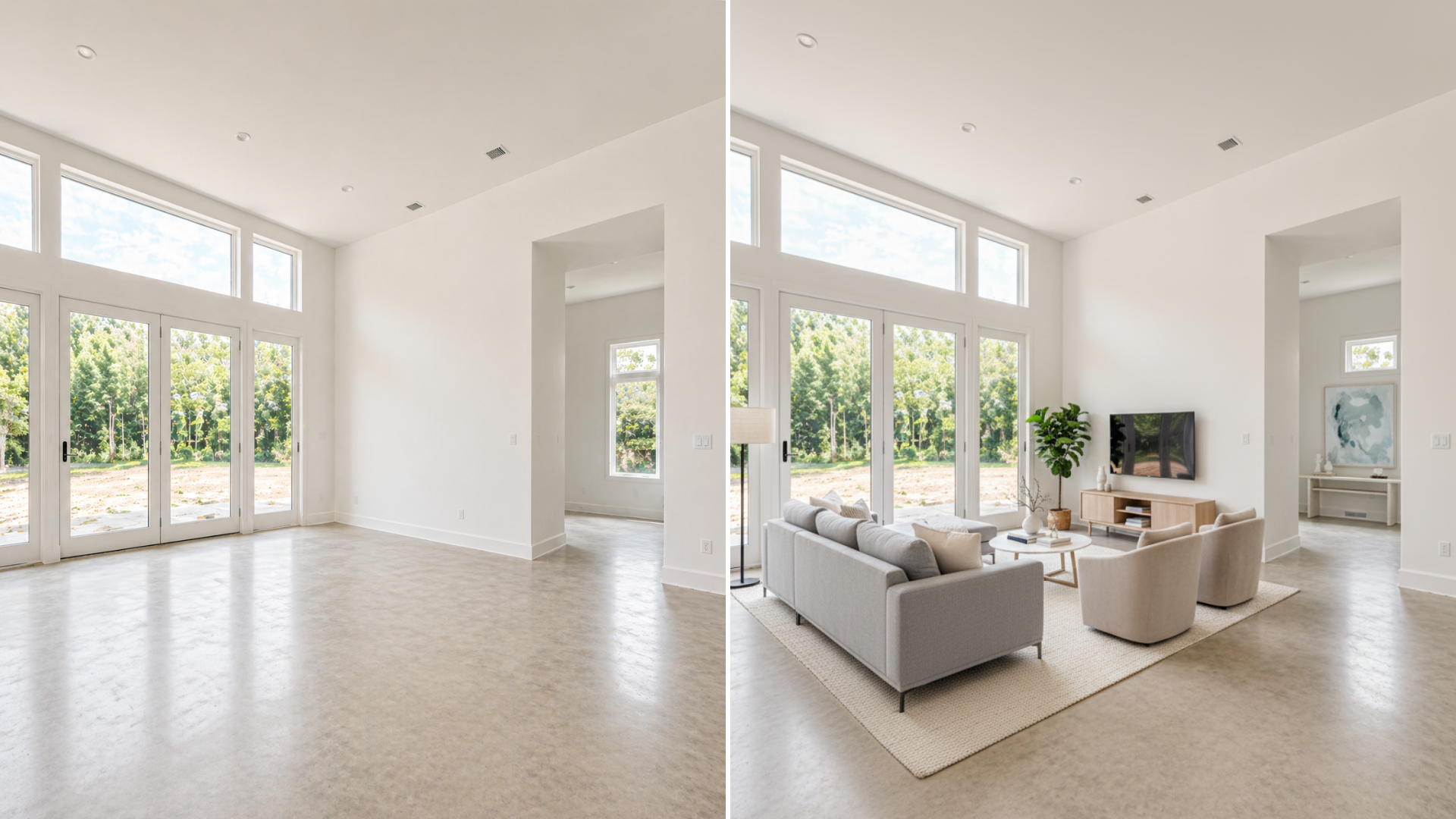
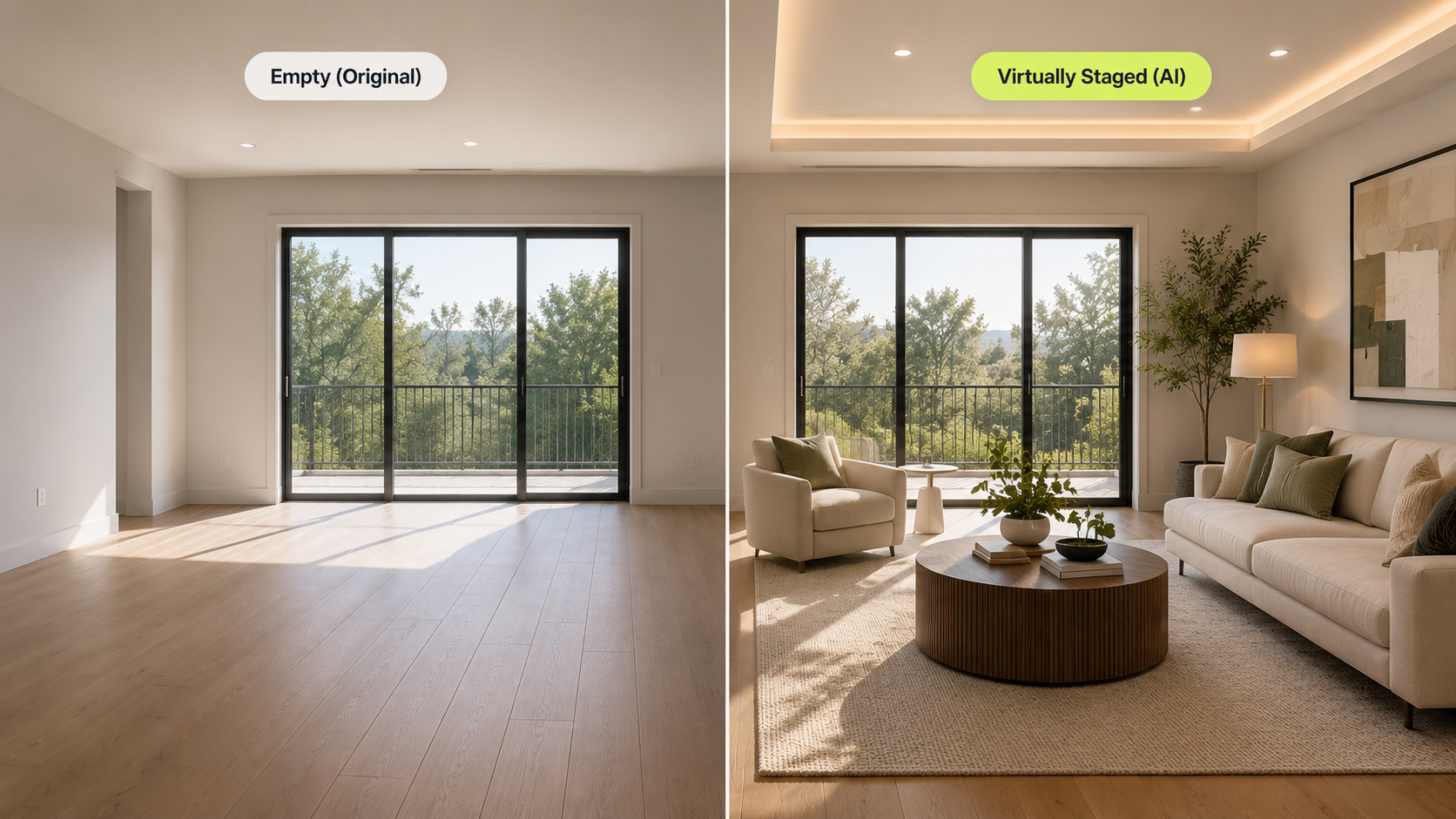
- Adding furniture to an empty room
- Removing existing furniture from an occupied room
- Replacing furniture or decor with a different staged look
- Changing wall color, flooring, cabinets, fixtures, landscaping, or views
- Creating twilight, renovation, or future-condition images that could be mistaken for the current property
- Using AI to make a room appear larger, brighter, more finished, or differently configured than it is
Routine image cleanup is different. Many MLSs allow ordinary adjustments such as cropping, exposure, sharpening, white balance, color correction, and straightening when those edits do not change the representation of the real property. When in doubt, disclose. A clear label is usually easier to explain than an unlabeled altered photo.
Where DesignSense fits in the workflow
DesignSense helps you create the staged visual. It does not decide whether your MLS accepts the image, what label your MLS requires, or whether your brokerage wants an additional disclosure. That boundary matters. DesignSense is strongest when the team starts with a real room photo and needs a faster staging decision. A practical workflow looks like this:
- Upload the original listing photo.
- Generate a few realistic staging directions.
- Reject versions that change the room structure, scale, fixtures, or permanent property condition.
- Choose the clearest version for buyer understanding.
- Add the MLS-required disclosure before upload.
- Include the original unaltered photo if your MLS, brokerage, or state rule requires it.
If the final image is a little soft after staging, use the AI upscaler after the staging direction is approved. Do not polish every draft. Keep the review loop focused on the images that might actually be published.
Turn one room photo into a clearer next step.
Upload a room photo, test one or two believable directions, and get to a publishable listing visual faster.
A practical MLS upload checklist
Before a virtually staged image goes live, run a quick checklist:
- Confirm the local rule with your MLS or brokerage compliance contact.
- Save the original unaltered room photo.
- Compare the staged image against the original for furniture scale, room size, windows, doors, fixtures, flooring, and layout.
- Remove any version that changes permanent or structural features.
- Add a clear label such as "Virtually Staged" or your brokerage-approved wording.
- Put the label where your MLS expects it: photo caption, photo description, image overlay, public remarks, or another required field.
- Upload the original before or after the staged photo when required.
- Keep a record of which original photo produced each staged version.
This turns compliance into a repeatable production step instead of a last-minute decision.
Common mistakes to avoid
The biggest mistake is treating disclosure as optional because the staging looks tasteful. Good design does not remove the need for a label. Other common mistakes include:
- Labeling only one photo when several listing images were staged
- Using vague wording that does not make the digital edit clear
- Burying the disclosure in private agent remarks when buyers need to see it
- Replacing the real empty room photo entirely when the MLS requires an original
- Changing finishes, views, landscaping, or fixtures and calling it staging
- Using AI to hide damage, utility poles, neighboring structures, floor problems, or other real conditions
Virtual staging should help buyers understand the property. It should not make the property into something else.
Occupied listings need the same care
Vacant-room staging is the easiest case to understand. The room is empty, the staged version adds furniture, and the image should be labeled.
Occupied listings can be trickier. If AI is used to remove furniture, replace decor, declutter heavily, or make the room look materially different, disclosure is still the safer default. The buyer is still seeing an image that no longer matches the current room. For most agents, the practical rule is this: if the buyer would notice the difference during a showing, label the image.
FAQ
Is there one national MLS rule for virtual staging?
No. MLS rules are local, and state law can add another layer. Many markets require clear labeling, but wording, placement, original-photo requirements, and enforcement vary.
What disclosure label should I use?
Use the wording your MLS or brokerage requires. If there is no required phrase, common labels include "Virtually Staged," "Digitally Altered," or "Digitally Enhanced." The label should make the altered nature of the image obvious to consumers.
Does DesignSense add MLS disclosure labels automatically?
No. DesignSense creates the staged output. Agents and brokerages are responsible for MLS captions, overlays, remarks, original-photo sequencing, and any legal or brokerage-specific requirements.
Do I need to show the original unaltered photo?
Sometimes yes. Some MLSs and state rules require the original unaltered image to appear near the altered image or be available through a public link. Even where it is not required, keeping the original in the listing set can reduce buyer confusion.
Can virtual staging change flooring, wall color, cabinets, or landscaping?
Be very careful. Many rules treat those as material property changes, not simple staging. If the edit changes a permanent feature or a condition of the property, it may be prohibited, require a stronger disclosure, or need the original image displayed with it.
Final recommendation
Use AI virtual staging when it clarifies a real listing photo. Disclose it when the image has been staged or materially altered. Keep the original photo available. Confirm your local MLS and brokerage rule before upload.
That workflow gives agents the speed benefit of AI staging without asking buyers to guess what is real. To see where this fits in a full listing process, read how real estate agents use AI to stage listings faster or test virtual staging in DesignSense with one of your own room photos.
Turn one room photo into a clearer next step.
Use the free trial to turn one room photo into a staging direction that is easier to review, approve, and publish.